
Until now, a smart home meant buttons, apps and settings. Now you can also ask it. If you connect myIO to an AI assistant such as Claude or ChatGPT, you can talk about your home the same way you would with a person who sees everything and can reach everything you allow.
What can you ask?
Anything about your home. A few examples:
- “How warm is it in the house right now, room by room?”
- “Switch off the lights downstairs and lower the blinds.”
- “Was there a room today where the air dropped below 20 degrees?”
- “Switch on the garden light every day at sunset.”
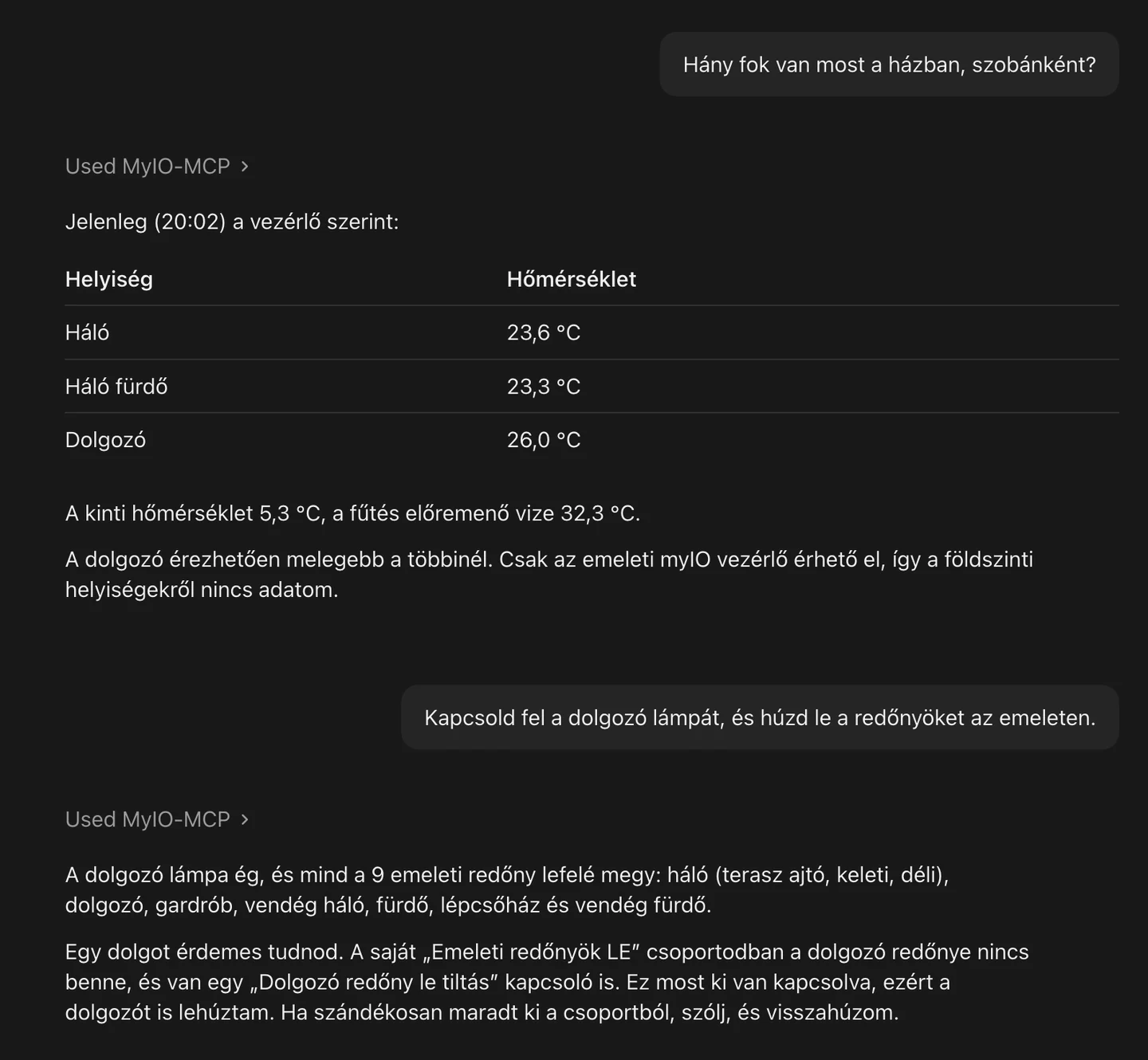
It does more than switch
The assistant looks into the logs and tells you what happened: when the heating came on, which sensor reported, why something did not start. It explains what things are for, and it helps with the setup too: it creates a timer, renames the outputs, puts together a group. What would take minutes of clicking on a settings page, you can ask for in one sentence.
If you get stuck, it can also read the myIO documentation on our documentation server and answer from that. You can read about it on the Support page.
How do you connect it?
- Download the add-on. The connection is provided by myIO MCP, a free, open-source add-on. You will find it on the Downloads page.
- Install it. It installs into the Claude desktop app with a double click. It works with ChatGPT too; there the setup takes several steps, and its guide is being written.
- Enter your myIO. The address of myIO, a user name and the password. Then you can start asking.
It is worth creating a separate user for the assistant on myIO, and you can also set how far it may go: it can only switch things, or it may change settings too. It works with every myIO.
What stays at home, and what goes to the assistant?
The add-on runs on your own computer and reaches myIO from there. The AI assistant, however, works on its provider’s servers: what you ask it, and what it learns about myIO for the answer (for example the temperatures or the names of the outputs), reaches the provider. The provider’s own rules apply to that. If you would rather not, myIO works just the same without it: the assistant is an extra, not a requirement.
Frequently asked questions
Does it understand Hungarian?
Yes. The conversation above was in Hungarian with Claude: you ask in a natural sentence, and you do not have to learn commands.
Which myIO does it work with?
All of them: the V3, the V4 GIGA and the V4 Opta. For features that only exist on V4, you get a clear error message on the V3.
Does it cost anything?
myIO MCP is free. The terms of using the AI assistant are set by its provider.
What if it misunderstands something?
Before it changes settings, it is worth asking it to tell you first what it is going to do. If you only give it the right to read and switch, it cannot change the settings at all.
For professionals
- myIO MCP: a Model Context Protocol server, based on Node.js, over stdio and Streamable HTTP; open source. There is also a one-click package (.mcpb) for the Claude desktop app.
- More than 100 tools: reading, switching, settings, timers, users and permissions, Flow, myIO Script, logs, diagnostics, integrations and bridges. One server can handle several controllers.
- The write level can be limited: state only, settings or admin. Commands run with the permissions of the given myIO user.
- Works with V3 and V4; features only available on V4 return a clear error message on the V3.
- Download and source code: Downloads. Details: Integrations.